Showing posts with label Android. Show all posts

Tuesday, 2 June 2015

New app lets you control exactly how much energy each appliance uses

Australia's national science organisation, the CSIRO, has developed a new app that lets you remotely keep track of exactly how much money you're spending on electricity at any given time - and even lets you monitor and control individual appliances from your phone.
While we can already stay on top of how much electricity our houses are guzzling on a daily basis using smart meters, the new prototype app - which is called 'Eddy' - wants to take things one step further by putting people in control of their power consumption, with the overall aim of saving people money and reducing greenhouse gas emissions.
Right now the app only works on big devices such as air conditioners and pool pumps, but the developers are hoping that in the future they'll be able to take it down to the level of monitoring and turning on and off individual lightbulbs. 

Friday, 22 May 2015

The Sony Xperia M4 Aqua is now available at the Carphone Warehouse, both in-store and online. The retailer will stock the smartphone in black, white and exclusive coral colors for just £15.50 a month.


A

Xperia M4 


B

For those of you who are not familiar with features of the Xperia M4 Aqua, the Sony smartphone is protected by scratch-resistant glass, dust and waterproofing. It's a fairly durable device with a 5-inch HD display, 13MP rear shooter, quad-core 1.5GHz CPU, 2,400mAh battery and runs Android 5.0 Lollipop.
Do note that only the black variant is available as of now. Both the white and coral editions will be arrive in June. Hit the link below for more details.


Thursday, 7 May 2015

Google will announce Android M at I/O keynote this month

Just as it's done in years past, Google will unveil the latest version of Android at its annual I/O developer conference. The company hasn't officially come out and confirmed this directly, but a session description that briefly appeared as part of the I/O schedule made specific mention of "Android M." (The session in question has now been removed from Google's I/O website.) When it was announced in 2014, Android 5.0 was first known as "Android L" before Google revealed its final "Lollipop" name months later. And while that version has so far made it to just 10 percent of all Android devices, Google isn't slowing down any in pushing the operating system forward.
Sadly the I/O session descriptions don't offer too many details on what to expect; the "Android at Work" session only says Android M "brings power of Android to all kinds of workplaces." Google has already started putting Android everywhere it can; it's on phones, tablets, in cars, powering TVs, and even running on Chrome OS. Now it sounds like there'll be a greater focus on making Android a force in the enterprise — and Google obviously needs developers to play a role in that.

Improved notifications and more powerful voice controls could be coming in Android M

Another session focused on "interruptions" hints that the company has been working to refine the new approach to notifications that came alongside Lollipop. Yet another session mentions something called "Voice Access" and suggests Google wants to let users control every feature of Android apps (and the device they're running on using only their voice. This would expand beyond the "OK Google" commands that are possible now. Google describes Voice Access as such:
Mobile hardware has adopted the touch screen as the primary mode of input. And with 1 billion active Android users, there’s no sign of this slowing down. What if you could provide users with a new method of access to your apps with little to no development overhead? In this talk, we introduce Voice Access, a service that gives anyone access to their Android device through voice alone. We will focus on simple steps developers can follow to ensure that Voice Access provides an optimal experience within their apps.
What might these changes look like? We'll know in only a few short weeks. Google's I/O keynote led by Sundar Pichai kicks off May 28th at 12:30PM.

Monday, 9 March 2015

Motorola Moto Turbo With 5.2-Inch QHD Display Launched at Rs. 41,999

Motorola India over the weekend teased the launch of the Motorola Moto Turbo in the country, and now, Flipkart on Monday has started taking pre-orders for the smartphone, which is priced at Rs. 41,999. The Flipkart page notes that the smartphone will be released in the third week of March.

The online retailer is also giving away launch day offers such as 100 percent cashback for 25 consumers and extra 10 percent off on the handset if purchased with American Express Cards. Notably, both the offers are only valid for Monday.

The Motorola Moto Turbo is a new variant of the Motorola Moto Maxx, which is the global variant of the Motorola Droid Turbo that is exclusive to US mobile carrier Verizon. Back in February, Flipkart teased the launch of the high-end Moto Turbo on Flipkart without revealing more details about the handset.
(Also see: Motorola Moto Turbo vs Samsung Galaxy S6 vs HTC One M9 vs Xiaomi Mi Note)

Going by Flipkart's listing of the Moto Turbo, the handset comes with identical specifications as the Moto Maxx. It also sports two material builds - Ballistic Nylon and Kevlar Fibre on the rear.

Samsung Galaxy S6, S6 edge pre-orders reach 20 million

Samsung Electronics has more reasons to celebrate as its latest flagship Android devices received a total of 20 million pre-orders. That's a record high for the South Korean tech giant who is hoping that the two new models will exceed the past smartphones particularly the Galaxy S4 and Galaxy S5. The first country to receive pre-orders of the Galaxy S6 and Galaxy S6 edge was the Netherlands.

Information about the record-breaking pre-order came from an unidentified Samsung executive. He said that the Galaxy S6 received 15 million orders while the Galaxy S6 edge got 5 million from various mobile carriers all over the world. In Europe, the contract-free entry level Galaxy S6 (32GB) is priced at 700 euros (about $759) while the S6 edge is 850 euros ($921).

Shin Jong-kyun, Samsung Electronics' Mobile Chief, shared with the Korean media during the MWC last week that the response to the two new Galaxy models was better than before and as expected. He noted that pre-orders "are really huge". This is good news for a big company who suffered huge losses the past few months in the high-end phone category.

This year, Samsung is said to launch an aggressive promotional campaign to market the Galaxy S6 and Galaxy S6 edge, hoping to making a lot of money before Apple outs the next iPhone model.

The Galaxy S5 wasn't exactly a winner compared to the Galaxy S4 but the S6 and S6 edge seem better with the Exynos 7420 processor, more memory, and the flexible OLED display screen. More than a week after the official launch, the two latest Galaxies have scored highest in a recent processor benchmark.

Here is a quick rundown of the specs of the Android 5.0 Lollipop-powered Galaxy S6 and S6 edge: 5.1-inch OLED QHD display, 2560 x 1440 pixel resolution, Corning Gorilla Glass 4, Exynos 7420 processor, 32GB/64GB/128GB built-in storage capacity, LPDDR 3 3GB RAM, 16 megapixel main camera with optical image stabilizer.

Do you think the Samsung Galaxy S6 and S6 edge will beat the past Galaxy models?

Friday, 20 February 2015

Don’t Be Google..!!!!!!1

Dear Google: what happened? Android sales are falling. Chrome has become a bloated hog. Analysts are calling you the new Microsoft, or, much worse, “the new Yahoo!” And most damning of all: you have squandered our trust. You used to be special, Google. Or at least we used to believe you were special. But you seem more and more like just another megacorporation.


View image on Twitter
Does that sound harsh? Consider the Zoe Keating kerfuffle:
YouTube gave Keating a take-it-or-leave contract, some terms of which were unacceptable to her. Some of the terms were also pretty hard to understand […] As YouTube now explains it — following a public debate following Keating’s blog post — Keating has a relatively simple choice […] These responses go against descriptions of the agreement presented to Keating (and transcribed by her) by YouTube previously, and presumably represent an update to the contract’s terms.
At best, Google is guilty of incredibly confusing and heavy-handed communication, something they have long been (rightly) accused of. At best. But, as Jamie Zawinski put it:
This sounds like Google using the same strategy they used with Google Plus: instead of creating a new service and letting it compete on its own merits, they’re going to artificially prop it up by giving people no choice but to sign up for it. Except in this case the people being strong-armed are the copyright holders instead of the end users. (So far, that is! Wait for it.)
Consider “Never trust a corporation to do a library’s job“:
As Google abandons its past, Internet archivists step in to save our collective memory … Google Groups is effectively dead … Google News Archives are dead … Projects that preserve the past for the public good aren’t really a big profit center. Old Google knew that, but didn’t seem to care […] The desire to preserve the past died along with 20% time, Google Labs, and the spirit of haphazard experimentation.
…or, as VICE puts it: “Google, a Search Company, Has Made Its Internet Archive Impossible to Search.”
Consider “Google to shut down GTalk on February 16, will force users to switch to Hangouts“:
Remember the good old days, a decade ago, when everyone admired everything Google did? What happened?
…I believe I may have an answer or two to that question.
Google has long been a bizarre swan of a company. To the casual eye, it’s a billion Android phones playing YouTube videos, its nonpareil search engine, plus its Google X moonshots and miracles, robot dogs rescued from the military, SpaceX funding rounds, etc, all cruising effortlessly along. Call that Awesome Google. But under the waterline, a gargantuan advertising machine paddles desperately, propelling Awesome Google towards its applause. Call that Mammon Google.
For all those analysts cavils, Mammon Google is still a colossal money-making machine, and both it and Awesome Google employ thousands of the smartest people alive (including — disclaimer/disclosure — multiple personal friends.) I fully expect Google to overcome the business challenges it faces…
…but I no longer expect to be particularly happy about this.
We’ve all been conditioned to see Awesome Google, but of late, Mammon Google seems harder and harder to ignore. Why is this? There seems to be no need for this. Mammon is still pouring money into Awesome. So what happened to the golden glory-days Google we knew and loved?
It’s true what Ben Thompson of Stratechery says: Google today is very reminiscent of Microsoft in the 90s. They too were the beneficiary of a seemingly endless, unassailable, firehose of money. But instead of spending that money on moonshots, Microsoft became a much-loathed corporate predator that wasted colossal amounts of time and money on infighting and horrors like Microsoft Bob and Windows Vista. Why has Google apparently taken a few steps down that cursed primrose path? Why is Mountain View in danger of becoming the new Redmond?
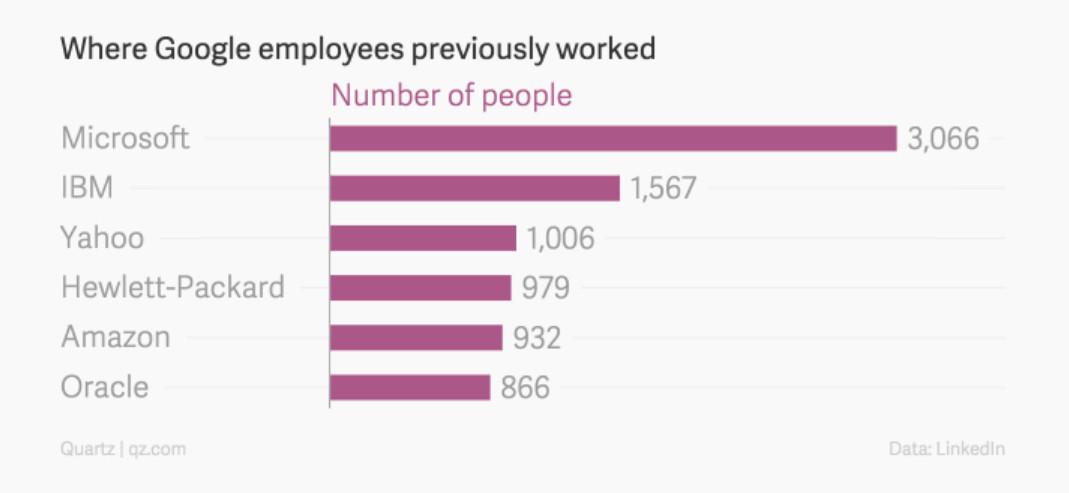
Why indeed. It turns out that Google is literally the new Microsoft:
(And we’re not just talking about low-level engineers here. Vic Gundotra, the former head of Google Plus, was a former Microsoft executive; which kind of explains a lot.)
This may help to explain why Google is, I believe, slowly but steadily losing our trust. Nowadays, when you interact with Google, you don’t know if you’ll be talking to Awesome Google; Mammon Google; …or a former Microsoftian whose beliefs and values were birthed in Redmond, and who, as a result, identifies a whole lot more with Mammon — and with bureaucratic infighting — than with Awesome.
Say what you like about Apple, and I can complain about them at length, you always know what to expect from them. (A gorgeous velvet glove enclosing an exquisitely sleek titanium fist.) But Google seems increasingly to have fragmented into a hydra with a hundred tone-deaf heads, each with its own distinct morality and personality. That wouldn’t matter so much if trust and awesomeness — “don’t be evil!” “moonshots!” — weren’t so intrinsic to the Google brand … which, to my mind, gets a little more tarnished every year.

Thursday, 5 February 2015

The Galaxy S6 will bring change to the entire mobile industry

The old way no longer works, so Samsung is looking to start anew


For all the criticism that Samsung has received for copying Apple over the years, it’s the times when the Korean company has copied itself that have proven most frustrating. Last year’s Galaxy S5 was a bigger version of the prior S4, which was a bigger version of the S III, which wasn’t all that great a smartphone to begin with. This sorry record of repetition caught up with Samsung in 2014 as better and cheaper alternatives undermined the Galaxy line’s dominance of both Android and smartphones in general. Stung by the unfamiliar sight of sales shrinking rather than growing, Samsung promised fundamental change to its smartphone range and the upcoming Galaxy S6 will be the truest embodiment of that reformation.
Samsung’s scale is such that when it chooses to change, the whole mobile industry feels the repercussions. So far, the key alterations from previous Galaxy S generations appear to be a move to an all-metal construction, a display that may be curved on one or both sides, and the repudiation of Qualcomm’s Snapdragon processors in favor of a full reliance on Samsung’s own Exynos. These factors all matter individually, but taken as a whole they mark a major departure from the almost cynical pragmatism with which Samsung has approached its phones in the past. Let’s address each one of them in turn.
An electronics empire made out of flimsy plastic is rebuilding with better materials
The company that built an electronics empire out of flimsy plastic is about to start competing on the strength of its design. Samsung promised as much in the summer of 2014 and delivered a good first taste of its new commitment to better design and materials with the Galaxy Alpha. Shortly thereafter, the Galaxy Note 4 and Note Edge followed, using similar metal frames and abstaining from Samsung’s previous penchant for simulating things like leather stitching and lustrous steel. Marrying that improved construction to Samsung’s typically strong set of hardware specifications has made the Note 4 the unanimous choice as Samsung’s best smartphone and the nearest and best competitor to Apple’s iPhone 6 Plus. This augurs well for the Galaxy S6.

Samsung will seek to distinguish its new flagship phone in a way that leaves no room for confusion about which Galaxy is top of its line, and the quickest way for achieving that is to use a unibody metal case like the one that leaked during CES last month (or this one). It would be a completely novel move for Samsung that would place serious pressure on HTC, a fellow Android phone maker that relies on its design lead as a major selling point. If Samsung successfully recreates the allure of HTC’s design — a very big "if" — it won’t matter who did it first or for how long. Samsung’s deeper pockets will ensure better marketing to consumers and more prominent positioning on store shelves, undermining HTC’s hopes for a revival in what will be a pivotal year for both companies.

The curved-edge display that was already rumored for the Galaxy S6 seemed to be confirmed by invites for the phone’s launch that were issued this week. They show a silhouetted line that most people have interpreted as a device akin to the Note Edge, where one side of the display slopes off. That doesn’t immediately match up with the metal shells that have been pictured so far, but then Samsung’s eagerness for differentiation could end up producing both an Edge variant and an all-metal version of the S6. In either scenario, the company will have something altogether new and exciting to present to its customers. The curved-edge screen remains a solution in search of a real problem to fix, but that won’t stop it from being eminently marketable. Having such a signature look would help set the Galaxy S6 apart from its competitors — and should developers make it as awesome as Samsung hopes, it would drive those competitors to emulate it and buoy a return to sales dominance.
Curved screens don't have to be useful to be marketable
While Samsung’s exterior alterations remain imperfectly defined ahead of its March 1st launch of the Galaxy S6, the biggest internal change is now all but confirmed: there will be no Snapdragon-powered S6. A Bloomberg report blames the latest Snapdragon 810 for overheating during Samsung’s testing, while The Wall Street Journal indicates that Samsung’s faith in its new 14nm Exynos chip also factored into the decision to snub Qualcomm’s offering. This will have a huge impact on Qualcomm, which relies on Samsung’s immense order of processors every year to keep a healthy bottom line. The chipmaker has already had to revise revenue forecasts for 2015 because one of its big customers won’t be using its flagship 810 processor, and Samsung is the biggest customer of them all.
Qualcomm’s mobile crown has been subtly slipping over the past year, and the latest data from Strategy Analytics (SA) shows that it had 80 percent of the LTE market in the third quarter of 2014 whereas it enjoyed a 95 percent dominance at the same time in 2013. MediaTek is taking sales away from Qualcomm and "during Q3 2014, HiSilicon, Intel, Marvell, and Samsung also made progress in LTE basebands," says Christopher Taylor, Director of SA’s wireless research group, foreshadowing greater competition for the year ahead.
samsung exynos
Is the Exynos processor ready to carry the full burden of Samsung's global sales?
Qualcomm’s lead in selling applications processors has been built on the strength of its integrated LTE modem, but Samsung’s progress has apparently been good enough to try to compete in 2015 instead of just playing along. It’s a momentous decision — given how many millions of smartphone sales are on the line — and should dispel some of the hardware homogeneity that has set in among flagship Android smartphones over the past two years. An Exynos-powered Galaxy S6 would join the iPhone 6 in offering an alternative to the Snapdragon 810 that's still likely to figure in most other flagship devices, and would add a vector of differentiation between Samsung’s best and the rest.
Different doesn't guarantee better, but it's a necessary first step
Samsung rose to its position as the world’s most prolific smartphone maker by simply packing more features and higher specs than the competition into a calculatedly cheap plastic shell. It wasn’t about being unique or different, it was a simple cost-benefit analysis that worked out well for the consumer and even better for Samsung. But the world that embraced those devices and rewarded Samsung for its strategy is no more. Now there’s a dichotomy of ultra-cheap handsets, where Chinese competitors are beating Samsung at its own game, and super high-end smartphones that come with high demands for beautiful aesthetics and premium materials. Addressing the latter of those challenges starts in earnest on March 1st.
The Galaxy S6 will be different, both from what Samsung has done until now and from the rest of the smartphone market in 2015. Being different isn’t the same thing as being better, but it’s a necessary first step along the way.


Friday, 30 January 2015

Want To Hack Into Your Android-Powered Smartphone? Here Are 10 Neat Tips!

A lot of tech savvy users like to play around with their smartphones. From editing your lock screen to using your phone to perform other activities, your smartphone can be used for all of them. Here are a few fun hacks that can come in handy!

Android, android smartphone, hacking, Force reboot, safe mode, face detection, phone status, SD card, Hard Reset, Factory reset, Context menu


1.Force reboot

-Press Power Button + Home Key + Volume up button simultaneously, and you can reboot your Android smartphone in case it's frozen.

2.Quick Google Access

Did you know that Android smartphones provide an easy way to access Google search in just a single click.

-Press menu key, hold it for couple of seconds and you'll have Google search ready for all your search needs.

3.Reboot Android in safe mode

Android versions jelly bean and upwards provide an option to reboot in safe mode.

To reboot in safe mode:

-Long press the power button

-Long press on the power off option

Users will be prompted to confirm a reboot in safe mode

The trick will disable all the 3rd party applications on your device, and is particularly helpful when either of these apps is playing spoilsport. You can re-enable the applications when you reboot your phone normally.

4.Unlock android phones by face detection

Android versions jelly bean and upwards provide a way to unlock your smartphone using face detection. Android jelly bean has added another layer of protection to make the feature even more secure. The smartphone can only be unlocked when the face matches as well as you require to blink your eyes to allow access. The blinking feature tells the device that you're alive and not a still image used by someone other than you to access your device.

To turn on the feature:

-Settings > Security > Screen lock > Face unlock

5.Get detailed information about phone status

Get detailed statistics like phone information, battery information, usage statistics and WiFi information by simply dialing the USSD code *#*#4636#*#*.

6.Move android apps to SD card

To move apps from your Android phone memory to SD card:

-Settings > Application settings > Manage application > Select the application > Move to SD card

7.Hard Reset and Factory reset your android phone

-In case of factory reset, your phone will be formatted to factory level: all your settings will go back to factory default and all the internal data will be deleted.

To factory reset a phone dial *#*#7780#*#*.

-In case of hard reset, all the data (including internal and external SD data) as well as settings of your android phone will be deleted without prompting for a confirmation.
To hard reset a phone dial *2767*3855#.

8.Context menu in android

Long pressing on the screen will bring out additional options for customising your android device.

9.Taking screen shots on android phone

You can take the screen shot on your Android phone without using any 3rd party application.

-For most Android phones: Press the Home button + power button.

-For Galaxy Nexus: Power button + volume down button.

-For Galaxy Note 2 and S3: Swipe your palm on the screen to take screen shot.

And so on.

10.Android Version Animation

-settings > about phone > Tab repeatedly on ‘Android version’.

The Android version will be animated after sometime.

Wednesday, 21 January 2015

10 Tips And Tricks For Android Lollipop!


Google launched Android v5.0 Lollipop last year. The update brought many important changes to Google’s open source mobile platform. Google has added many new features and shortcuts. Everything on the Android has changed with the new UI based on Material design language. Let’s take a look at top 10 tips and shortcuts for Android v5.0 Lollipop.
1. Settings Search Bar
Settings menu in Android Lollipop has its own search bar. This may look like very minor addition but it comes handy at times. For example, if you are looking for specific network settings and you don’t know where to look for, you can simply search for network and find out your needed setting in matter of seconds. This one minor addition has increased the efficiency of Lollipop to high extent.
2. Swipe With Two Fingers
Lollipop has redesigned notification bar. You can simply swipe down once from top of your screen to look at notifications and swipe down more to access quick settings. However, if you swipe with two fingers of one, you can directly access quick setting options. Quick settings include shortcuts to all necessary Android features.
3. Flashlight
Android has now built its own flashlight button, you can access it from notification bar quick settings. You no longer need to install some third party app to use flashlight. With this option, you can use your phone’s LED flash as flashlight. This is a standard flashlight app like the one Windows phone or iOS.
4. Data Usage Notification
This feature comes handy when you are on strict data plan. Everyone of us has tendency to go bit overboard when it comes to internet data usage. You can enable data usage notification and use two finger swipe on notification bar to access quick setting then, you can tap on phone’s signal symbol to set specific data warning as well as data limit. If you set data limit at 5GB per month ad warning at 4GB. The phone will show you warning at 4GB and data will be automatically turned off at 5GB.
5. Hide or Disable Sensitive Notifications
Google has focused on enriching the notifications in Lollipop. You can now see the notifications right on lock screen. You can see what’s happening just by taking glance at your lockscreen. The downside is, anyone can see those notifications on lock screen hence, Google has added an option to hide notifications that include sensitive content. You can find this option under Settings > Sound > Notifications.
6. Remove Notification Spams
Lot of notifications come with lot of apps. Sometimes they are helpful such as, news or weather updates in notifications but sometimes they are quite painful like, a software update for not-so-important app or some games that keep pushing you notifications to buy upgrades. You can tap and hold on such notifications until a small ‘i’ appears on right hand side. You can tap ’i’ and block the app from sending such notifications.
7. Do Not Disturb

Android Lollipop’s DND (Do Not Disturb) feature is quite easy to set up and user friendly. You can use your volume rocker and a small pop up with come up with options, None, Priority and All. Simply tap on None and no notifications will disturb you anymore. This includes calls, texts, updates and even alarm. If you choose Priority, then only predefined notifications will be shown.
8. Profiles
With Android Lollipop, you can create custom user profiles. Simple swipe down your notification bar and tap profile icons in the top right hand corner to view user profiles. You will see your own user profile activated. There is an option to login as guest or create new profile. This feature comes very handy when you are loaning your phone to friend or co-worker, you can simply change the profile to Guest and lend the phone to other person.
9. Pin Your Screen
You can limit the functionality of your phone by pinning your phone. Go to Settings > Security and activate Screen Pinning feature. You can even pin single app to your screen by switching to multi select view and selecting green pin button next to each app. The specific app will say open while other functionality in your phone will be disabled. This feature comes handy while lending your phone to somebody else.
10. High Contrast Text
This is experimental feature in Lollipop. You can enable high contrast text by heading to Settings > Accessibility > System Sub-Heading. If you are struggling to read text on your smartphone, you can enable high contrast text. It makes everything look different. The feature comes handy when you have trouble reading or typing specially while travelling.

Sunday, 11 January 2015

Top 8 Android Apps To Automate Tasks!

We live in a tech era where we want everything to be automated. With the versatility of Android and open source, it has become possible too. Number of Android apps are already available that makes this possible. There are limitless things that you can do with Android devices. Power users often tend to use apps that automate the task. Most of these apps are available for free. Today we have listed 8 such apps that can automate your day-to-day activities.
1. SkipLock :
This is a leading password storing app that offers reliability and great user experience to users. The app offers great features to every Android device and users. The app is designed to skip the lockscreen when you are connected to custom configured WiFi network or Bluetooth device. You can even unlock the smartphone by connecting it to paired Bluetooth smartwatch, headset or a car.
2. TOT (Turn Of Text) :
This app promotes safe driving to users. You can set the speed limit and once the speed limit of your vehicle exceeds, the app automatically blocks the alert for incoming text messages. The app has one more add-on version for parents. Parents can remotely block texting for their child’s safe driving. TOT automatically replies to texts received during blocking period.
3. Call Recorder – ACR :
This is another free call recording app. The app features number of functions such as recording, password protection of recordings and various other recording formats too. You can also flag the important and non-important call recordings for the easier access and filtering. You can filter the calls by number, contact name and dates.
4. Changelog Droid:
If you are tired of checking for the update for apps installed on your Android device, this app comes to a great use. You can check the changelog of the app pretty easily using this application. The app checks for the updates in background and also notifies you with the changelog of new version of app. This gives you a choice to know if the app update is really important or not.
5. App Cache Cleaner:
Another big issue of Android apps is the amount of cache data and temporary files it collects. This app simplifies the headache. You can easily check for the cached memory files and junk using App Cache Cleaner. The best part is, the app is available for free and you do not need to have ROOT access to use the app.
6. Velis Auto Brightness :
The app has customised brightness modes which give you complete access to determine the right brightness for the environment that you are in. You can control and choose the optimum brightness level of your smartphone display using this app. This is a great replacement for the existing auto brightness feature in your smartphone settings.
7. AutomateIt:
AutomateIt allows you to automate Android device to run few specific tasks like triggering some specific features based on time and location. The app is very easy to use and comes with multiple customization options. The setup is pretty simple too. The app is great to automate your Android device to run certain tasks.
8. MacroDroid:
The app has very simple and user friendly interface. It can automate tasks. You can simply click on Add Macro to create a custom macro. The app lets you access to number of custom tasks from a list, you can configure an action for the task. There are multiple options to add more constrains too

Saturday, 10 January 2015

Top 8 Android Apps To Automate Tasks!

We live in a tech era where we want everything to be automated. With the versatility of Android and open source, it has become possible too. Number of Android apps are already available that makes this possible. There are limitless things that you can do with Android devices. Power users often tend to use apps that automate the task. Most of these apps are available for free. Today we have listed 8 such apps that can automate your day-to-day activities.

skiplock, TOT, changelog android, app cache cleaner, macrodroid, automateIt, top 8 android apps, password saver app, reliable android apps.


1. SkipLock :

This is a leading password storing app that offers reliability and great user experience to users. The app offers great features to every Android device and users. The app is designed to skip the lockscreen when you are connected to custom configured WiFi network or Bluetooth device. You can even unlock the smartphone by connecting it to paired Bluetooth smartwatch, headset or a car.

2. TOT (Turn Of Text) :

This app promotes safe driving to users. You can set the speed limit and once the speed limit of your vehicle exceeds, the app automatically blocks the alert for incoming text messages. The app has one more add-on version for parents. Parents can remotely block texting for their child’s safe driving. TOT automatically replies to texts received during blocking period.

3. Call Recorder – ACR :

This is another free call recording app. The app features number of functions such as recording, password protection of recordings and various other recording formats too. You can also flag the important and non-important call recordings for the easier access and filtering. You can filter the calls by number, contact name and dates.

4. Changelog Droid:

If you are tired of checking for the update for apps installed on your Android device, this app comes to a great use. You can check the changelog of the app pretty easily using this application. The app checks for the updates in background and also notifies you with the changelog of new version of app. This gives you a choice to know if the app update is really important or not.

5. App Cache Cleaner:

Another big issue of Android apps is the amount of cache data and temporary files it collects. This app simplifies the headache. You can easily check for the cached memory files and junk using App Cache Cleaner. The best part is, the app is available for free and you do not need to have ROOT access to use the app.

6. Velis Auto Brightness :

The app has customised brightness modes which give you complete access to determine the right brightness for the environment that you are in. You can control and choose the optimum brightness level of your smartphone display using this app. This is a great replacement for the existing auto brightness feature in your smartphone settings.

7. AutomateIt:

AutomateIt allows you to automate Android device to run few specific tasks like triggering some specific features based on time and location. The app is very easy to use and comes with multiple customization options. The setup is pretty simple too. The app is great to automate your Android device to run certain tasks.

8. MacroDroid:

The app has very simple and user friendly interface. It can automate tasks. You can simply click on Add Macro to create a custom macro. The app lets you access to number of custom tasks from a list, you can configure an action for the task. There are multiple options to add more constrains too.

15 Great Free Android Tutorials

Android Programming language utilizes specialized form of Java. Android is known to be a software stack consisting of an operating system, key applications and middle-ware. It is ideal for different kinds of mobiles and tablets. that provide a detailed description of all the aspects of an Android App along with the capabilities of an Android platform. Please refer to the links below-

1. Official Developer Tutorial – This is made by the android community and open source developers. It is a getting started tutorial designed for beginner developers.

2.Official Developer Tutorials Community - This is created by android community and is designed for experienced developers.

3.Tutorial by Lars Vogel -This is free single page web based tutorial created by Lars Vogel.

4.Android Tutorials By Core Servlets - This site consists of a series of android tutorial with exercise for each section. It also has some other good Java related tutorials for free.

5.Android Hive – This is a android tutorials blog by a enthusiastic android developer (Ravi Tamada) for sharing his knowledge and experience with the world.


Free Video Tutorials

These video tutorials are a great way to begin with Android. It is a huge tutorial series that is available online containing tons of free content, which is bound to teach you coding in the best possible manner. Please refer to the links below-

1. Chet Haase Android Tutorials on YouTube - Some great and simple tutorial by maker of Google and author CHET HAASE on youtube are, please see the links below:-

o DevBytes: View Animations
DevBytes: View Animations
o DevBytes: Property Animations
DevBytes: Property Animations
o DevBytes: Window Animations
DevBytes: Window Animations
o DevBytes: CrossFading Animations
DevBytes: CrossFading Animations
o

2.By Udemy

3.By OreillyMedia–

4.By MarakanaTechTV" target="_blank">By MarakanaTechTV

5.By Android User Group
Free E-books - The web is filled with over a hundred of free e-books on Android programming containing all the basic concepts relating to the language, both at the beginner and advanced levels. Please refer to the links below-

1.Android Tutorial By Stanford University

2.Android Tutorial

3.Commonsware Android

4.Andbook

5.E Reading Llib Android eBook
Related Posts Plugin for WordPress, Blogger...